What is digital asset management (DAM)?
Digital asset management is software for storing, organising, finding and sharing an organisation’s digital files: images, videos, audio, presentations, documents and design files. Its main job is to make assets easy to find, using a searchable index of each file’s content and metadata (descriptive information such as tags, rights and dates) [1].
A DAM usually adds the controls a shared drive lacks [1][2]:
- Metadata and search, increasingly with AI tagging, so people can find a file without knowing where it is saved.
- Workflow states such as draft, approved, live and archived.
- Version control and file history, so everyone works from the latest approved file.
- Access control by user role.
- Integrations with other systems, such as a website content management system (CMS), product information management (PIM) or enterprise resource planning (ERP) software.
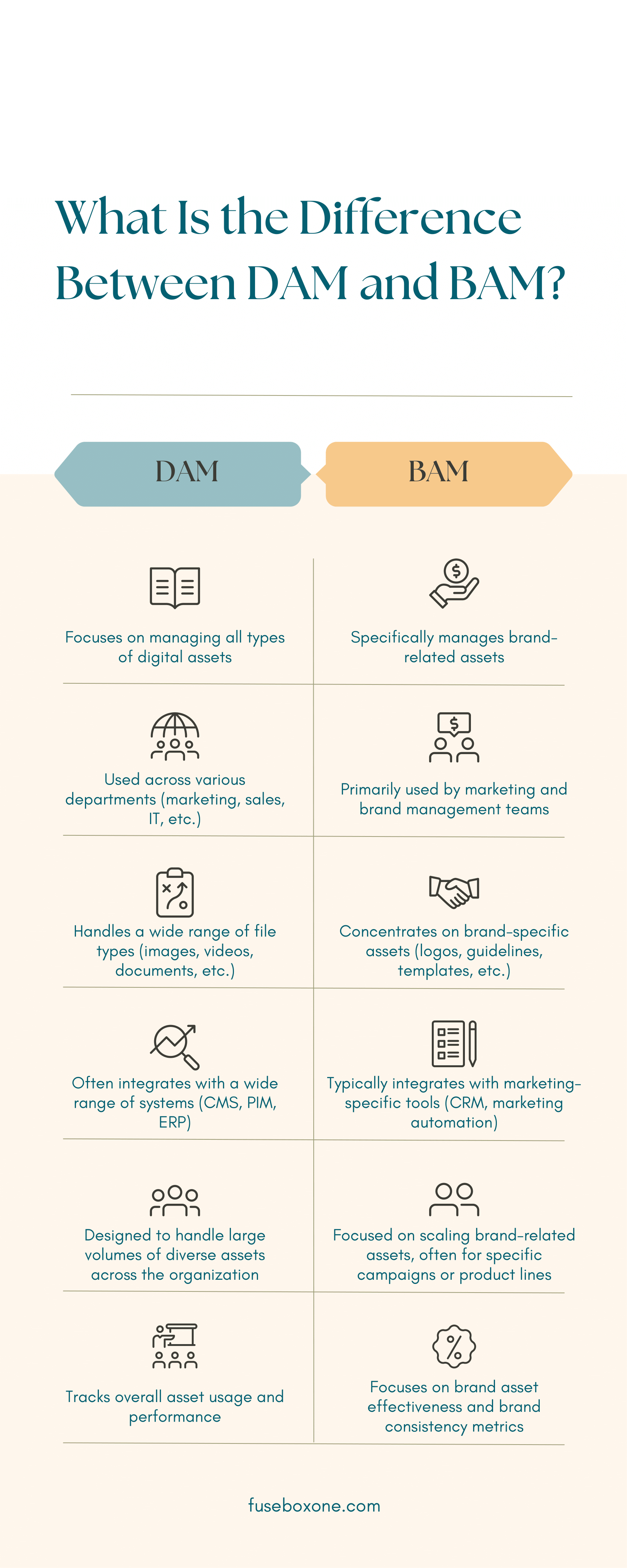
Because it holds everything, a DAM tends to be used across the organisation, by marketing, creative, sales, product and IT teams alike, as the comparison above from fuseboxone.com sets out.
What is brand asset management (BAM)?
In this context BAM stands for brand asset management: a system focused on the assets that define your brand, such as logos, fonts, colour palettes, brand guidelines, templates and approved images. Its purpose is to make sure everyone, inside and outside the business, uses the right, current versions [2].
MediaValet, a DAM vendor, describes BAM as a specialised subset of DAM, and Wikipedia likewise lists brand management systems as one type of DAM [1][2]. Typical BAM features are [2]:
- Access to brand-approved assets only.
- Brand guideline portals or microsites, often shared with agencies, freelancers and partners.
- Control over how and where brand assets are used.
- Templates so non-designers can produce on-brand material.
BAM vs DAM, the main differences
| DAM | BAM | |
|---|---|---|
| Scope | All digital assets | Brand assets only: logos, guidelines, templates |
| Main goal | Organise files and make them easy to find | Keep the brand consistent wherever it appears |
| Main users | Many departments: marketing, creative, sales, IT | Marketing and brand teams, plus external partners and agencies |
| Typical integrations | CMS, PIM, ERP and creative tools | Marketing tools such as CRM and marketing automation |
| Sharing | Portals optional | Branded portals are central |
| Measurement | Overall asset use and performance | Brand consistency and how well brand assets work |
This summary combines the infographic’s six-point comparison with MediaValet’s breakdown [2]. In short, a DAM is the library for everything, and a BAM is the controlled shop window for the brand.
Do you need a DAM, a BAM or both?
The two overlap more than the names suggest, and many products do both. MediaValet’s checklist is a useful starting point, bearing in mind that it sells a DAM [2]:
- If you manage large volumes of many file types beyond brand materials, such as product photography, video, campaign files and documents, you need a DAM.
- If your main problem is people using old logos or off-brand templates, especially agencies and partners, you need BAM features: approved-only libraries and brand portals.
- If you need both, look for a DAM that includes brand portals and templating, rather than running two systems.
Small businesses with a handful of logos and templates can often manage with a well organised shared drive and a brand guidelines PDF. The case for dedicated software grows with the number of people, partners and assets involved.
What to look for in a DAM or BAM system
Whichever you choose, the same practical questions decide whether people actually use it:
- Search. Can someone outside the marketing team find the right logo or photo in seconds? Good metadata and AI tagging matter more than storage space [2].
- Permissions. Can you give agencies and partners access to approved files only, without exposing drafts or internal material [2]?
- Portals and templates. Can you publish a branded portal or guideline microsite, and let non-designers make on-brand material from templates [2]?
- Integrations. Does it connect to the tools your teams already use, such as your CMS, design software and marketing platforms, so files do not get downloaded and re-uploaded [1][2]?
- Reporting. Can you see which assets are used, by whom and where? This is how you spot outdated files still in circulation.
Is DAM the same as a CMS?
No. A DAM stores and manages assets, while a content management system builds and publishes web pages. They are often connected: a website CMS can act as the front end that displays files held in the DAM, so images are updated everywhere when the master file changes [1].
Questions about BAM vs DAM
What does BAM mean in business?
In marketing and asset management, BAM means brand asset management, a system for storing and controlling brand assets such as logos, fonts, guidelines and templates so they are used consistently [2]. In other fields BAM can mean other things, such as business activity monitoring.
Is brand asset management a type of digital asset management?
Generally, yes. Wikipedia lists brand management systems as one type of DAM, and MediaValet describes BAM as a specialised subset of DAM [1][2].
What are digital assets?
Any file an organisation owns and uses: images, logos, videos, audio, presentations, PDFs, design files and documents, together with their metadata [1][2].
What does DAM stand for in cybersecurity?
In security, DAM usually means database activity monitoring, a technology for watching and analysing activity on databases. It is unrelated to digital asset management [4].
Who uses brand asset management software?
Mainly brand and marketing teams, and the agencies, freelancers, franchisees and sales teams who need approved brand materials [2].
Sources
- Wikipedia, Digital asset management.
- MediaValet, BAM vs DAM, Choosing the Right Asset Management Solution for Your Brand, 25 June 2025.
- Reddit r/Infographics, DAM vs. BAM, Understanding Digital Asset and Brand Management, the earliest copy of the infographic we found, posted August 2024. The graphic carries the web address fuseboxone.com, which now redirects to an unrelated site.
- Wikipedia, Database activity monitoring.
Last reviewed 2 November 2026